Take helicopter control into your own hands.
A dedicated collective lever with an integrated twist throttle. Make small, deliberate inputs for hovering, approaches and landings.

See how it flies.
Explore the controls, setup and flying experience in this creator review.
MechDIY supplied a sample for the review. Individual experiences and aircraft settings may vary. Watch on YouTube ↗

Lift the lever.
Twist the throttle.
Assign the lever to collective pitch and the rotating grip to your aircraft’s throttle input. Two separate movements bring a helicopter-style control layout to your simulator.
Throttle behavior depends on the helicopter and its engine governing system.

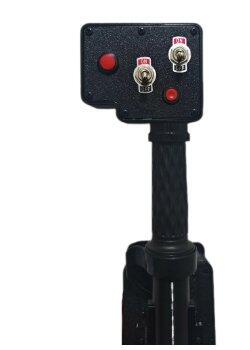
Keep key commands within reach.
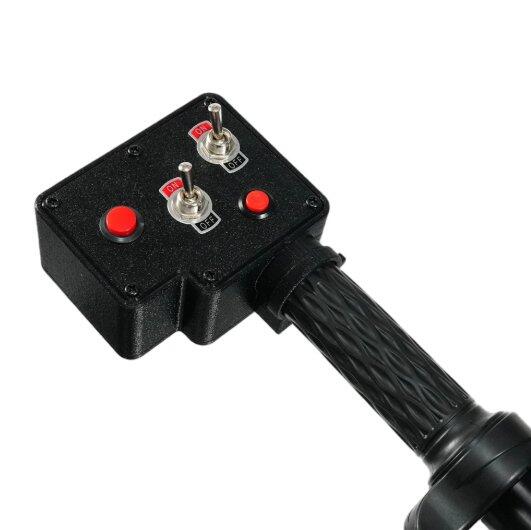
Two self-centering momentary buttons and two metal toggle switches let you assign supported cockpit commands, from lighting to communications.
Choose bindings that suit your aircraft and keep frequently used functions close to your hand.

Find your preferred control feel.
Adjust the damping screw on the base with a Phillips screwdriver for lighter or firmer lever movement.
Fine-tune response curves and sensitivity separately in your simulator to suit your aircraft and flying style.

A practical build.
A textured grip.
PETG 3D-printed construction pairs with a textured grip for a functional home simulation controller.
Close-up photos show the real surface finish and construction.

Build your setup at your desk.
No cockpit frame? The compatible aluminum alloy desk mount offers an alternative mounting option with 30mm mounting-hole spacing.
Check desk suitability and allow clearance for the full movement of your controls.
View the Optional Desk Mount ↗Desk mount sold separately. Not included with the collective.
See the desk mount installation.
Follow the video to see the mounting process. Secure the hardware before use, and check that the lever clears your desk, chair and other controls throughout its travel.
The collective can also be installed on a compatible aluminum extrusion cockpit frame.
Watch the Installation on YouTube ↗Connect. Assign. Fly.
For MSFS 2020/2024, X-Plane 11/12 and DCS World. No additional device software required.
Connect via USB
Connect the collective to your Windows PC.
Assign your controls
Bind collective, twist throttle, buttons and switches for your aircraft.
Check before takeoff
Test axis range and direction. Remove conflicting bindings and adjust sensitivity if needed.
Windows PC only. Xbox consoles are not supported. Simulator compatibility does not mean every aircraft comes with a preconfigured profile.
Details that matter.


Specifications
| Controls | Collective axis + twist throttle axis |
|---|---|
| Buttons & switches | 2 self-centering momentary buttons + 2 metal toggle switches |
| Construction | PETG 3D-printed structure + electronic components |
| Connection | USB |
| Computer platform | Windows PC |
| Simulator support | MSFS 2020/2024, X-Plane 11/12 and DCS World |
| Product dimensions | Approximately 43 × 10 × 10 cm |
| Product weight | Approximately 1.8 kg |
| Mounting | Compatible cockpit mounting setup or optional desk mount (sold separately) |
Frequently Asked Questions
Which simulators does it support?
Designed for Windows PC use with MSFS 2020/2024, X-Plane 11/12 and DCS World. Configure the controls for your chosen aircraft.
Does it work with Xbox consoles?
No. Windows PC versions of MSFS purchased through Steam or the Xbox Store are supported; Xbox consoles are not.
Do I need drivers or MobiFlight?
No additional device software or MobiFlight is required. Connect via USB, then assign the axes and buttons in your simulator.
Is the desk mount included?
The desk mount is an optional accessory sold separately. Use your own compatible mounting setup or purchase the compatible 30mm desk mount .
Can I adjust the resistance?
Yes. A Phillips screwdriver can be used to adjust the damping screw on the base. Mechanical resistance is separate from simulator sensitivity settings.
What if the lever slowly drops when released?
Check the damping adjustment and your mounting stability. If the issue continues, contact MechDIY support for assistance.
Why is the collective moving in the wrong direction?
Check the axis assignment and inversion setting in your simulator. Test the full lever travel before flying.
Why is the twist throttle not working as expected?
Check aircraft-specific bindings and remove conflicting assignments. Some helicopters use automatic governing, so the role of the throttle varies by aircraft.
Is it suitable for larger hands?
Some reviewers found the grip space compact. Contact us before ordering if you would like help checking the grip size for your setup.
Is it an all-metal controller?
No. It uses a PETG 3D-printed structure with electronic components and metal toggle switches.
Does it replace a cyclic or pedals?
No. It provides collective and twist throttle inputs. Cyclic and yaw inputs must be provided through other controls or supported simulator input methods.
Stay connected. Share your setup.
Follow our Facebook page for product news and tutorials. Join our flight sim group to share your cockpit, ask questions and connect with fellow pilots.